Our DanMagi engineers have prepared this list of Frequently Asked Questions for you.
What is DanMagi?
DanMagi is a global provider of a leading cloud-based High-Speed Internet Access (HSIA) solution for the Hospitality Industry.
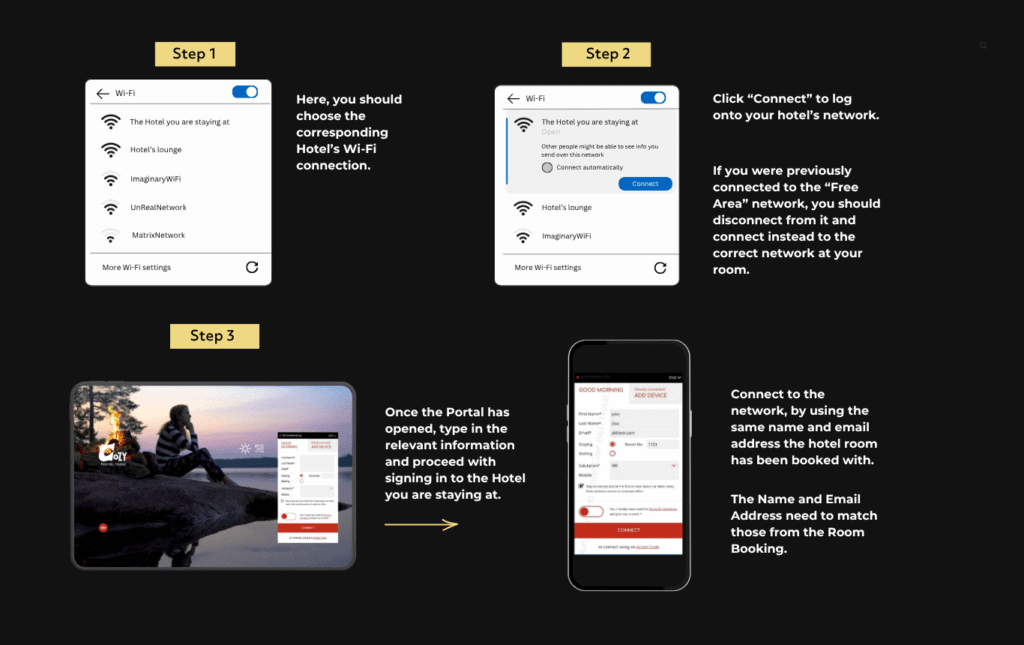
How you can connect to your Hotel's Network?
For signing in to the hotel’s network, you should first click the Network Symbol 🛜 and then find the corresponding network connection.
If you use a VPN connection, you must first turn it off in order to connect to the Wi-Fi network, to assure there will be no interference from it.
Once you are connected to the Wi-Fi, you can reactivate your VPN.
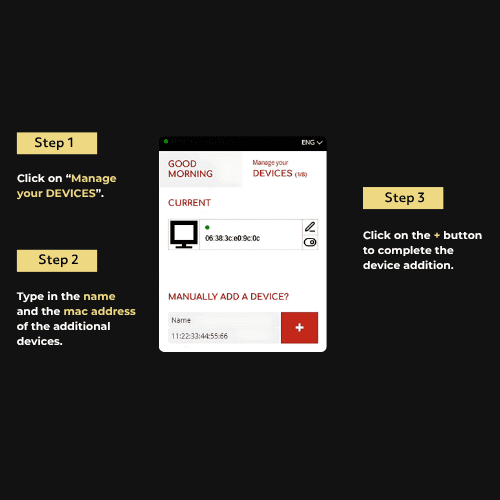
How do I connect to the Wi-Fi network with multiple devices?
With these 3 simple steps, you can easily connect your multiple devices to your Hotel’s Wi-Fi network.
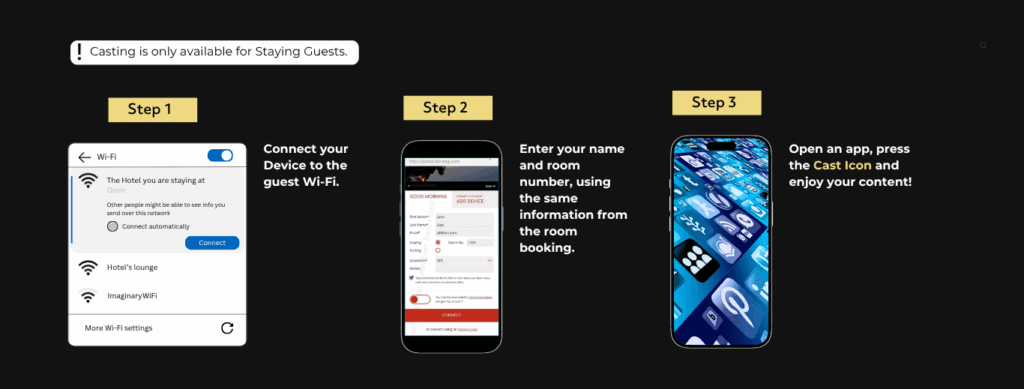
How can you cast?
DanMagi made Casting simple!
What is Casting?
Casting refers to the process of streaming or sharing content from a mobile device (like a smartphone or tablet) to another device, typically a larger screen, such as a smart TV, computer, or projector. This can include sharing videos, photos, presentations, or even mirroring your device’s screen in real time.
There are several ways mobile casting can work:
Screen Mirroring
Streaming Content
Wireless Projection
What is Screen Mirroring?
This mirrors the mobile device’s screen directly onto a larger display.
For example, using features like Apple’s AirPlay or Google’s Chromecast, you can show whatever is on your phone’s screen on a TV or computer.
What is Streaming Content?
Mobile casting can also refer to streaming videos or audio content directly from apps (like Youtube, Netflix, or Spotify) to a larger device.
For instance, using Chromecast, a mobile device can cast videos directly to a smart TV.
What is Wireless Projection?
In some cases, mobile casting involves projecting content wirelessly onto a compatible projector or large screen without using cables.
Cookies preferences
✕
Others
Other uncategorized cookies are those that are being analyzed and have not been classified into a category as yet.
Necessary
Necessary
Necessary cookies are absolutely essential for the website to function properly. These cookies ensure basic functionalities and security features of the website, anonymously.
Advertisement
Advertisement cookies are used to provide visitors with relevant ads and marketing campaigns. These cookies track visitors across websites and collect information to provide customized ads.
Analytics
Analytical cookies are used to understand how visitors interact with the website. These cookies help provide information on metrics the number of visitors, bounce rate, traffic source, etc.
Functional
Functional cookies help to perform certain functionalities like sharing the content of the website on social media platforms, collect feedbacks, and other third-party features.
Performance
Performance cookies are used to understand and analyze the key performance indexes of the website which helps in delivering a better user experience for the visitors.
We value your privacy
This website uses cookies to improve your experience while you navigate through the website. Out of these, the cookies that are categorized as necessary are stored on your browser as they are essential for the working of basic functionalities of the website. We also use third-party cookies that help us analyze and understand how you use this website. These cookies will be stored in your browser only with your consent. You also have the option to opt-out of these cookies.